How It Works
Two-Way Contact Sync
Sync contacts between QuickBooks and Less Annoying CRM in both directions.
Pull & Compare Contacts
We pull all contacts from both QuickBooks and Less Annoying CRM, then compare them using smart matching based on name and email.
Link Existing Matches
If a contact already exists in both systems, we mark them as matched in our backend so they won't be duplicated or synced twice.
Add New Contacts
Contacts that don't exist in the other system are added automatically — including their name, email, website, company, phone, address, and other important details.
Batch Processing (20 at a time)
The sync processes 20 contacts per batch. You can stop at any point to review the results in the destination system before continuing.
Resume Anytime
Click "Sync" again to resume from where you left off. The system remembers which contacts have already been synced.
Review Logs
Check the runtime logs on your dashboard to see exactly what happened — which contacts succeeded, which were already matched, and which failed (with reasons).
Invoice Summaries
Add invoice summary notes to existing Less Annoying CRM contacts from QuickBooks.
How It Works
This process adds a new Note to existing Less Annoying CRM contacts for any matching QuickBooks contacts. Each note contains the contact's up-to-date QuickBooks Online invoice summary, including unpaid invoices, overdue invoices, payment status, and totals — giving you clear financial context without modifying any contact details.
First Time Tip
For your first update, we recommend selecting "Update Invoice Summaries" and then clicking Stop a few seconds after the batch starts. This allows you to review the results in Less Annoying CRM and confirm everything looks correct before continuing. No existing contacts or data in LACRM will be overwritten during this process.
Important Notes
- • Invoice summaries can only be created for contacts that have been synced to Less Annoying CRM (via Sync New Contacts).
- • Invoice summaries can only be updated once every 24 hours per contact.
- • Contacts without invoices or without pending/unpaid invoices will not receive any updates.
Example: Invoice Summary in LACRM
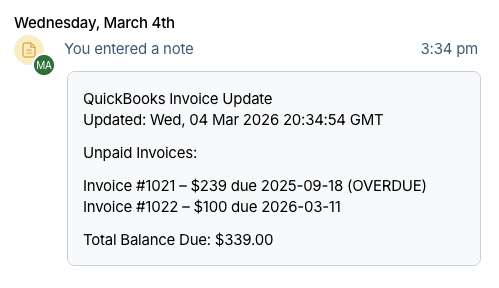
This is what an invoice summary note looks like on a contact in Less Annoying CRM.
Already have an account? Sign in