
How to Connect Less Annoying CRM to QuickBooks Online (Automatically)
A complete 2026 guide to syncing contacts and invoice data between Less Annoying CRM (LACRM) and QuickBooks Online — without CSV exports, duplicates, or manual data entry.
Updated June 2026 · 8 minute read
Why Less Annoying CRM and QuickBooks Don't Sync Natively
Less Annoying CRM is famously focused. It does one thing — simple, affordable contact and pipeline management for small businesses — and it does it well. Part of that philosophy is staying out of the accounting business. LACRM does not store invoices, payments, or balances.
QuickBooks Online, meanwhile, is the opposite: a powerful accounting platform with a customer list that lives inside the books. The customer record in QuickBooks belongs to the finance side of the business, not the sales side.
The problem is that small businesses run on both sides. Sales reps need to know whether a contact has unpaid invoices before calling them. Accounting needs new sales contacts as customers in QuickBooks before they can be invoiced. And nobody wants to maintain the same contact list in two places by hand.
That is the integration gap. Until LACRM and Intuit build a native connector, the only way to bridge it is with a third-party sync tool — and that is exactly what this guide is about.
The 3 Ways to Connect Less Annoying CRM with QuickBooks Online
Option 1 — Manual CSV Export & Import
Export your LACRM contacts to CSV, import them into QuickBooks Online (and vice versa). This is the only truly free way to move contacts between the two platforms.
Pros
- • Free
- • Works for one-time migrations
Cons
- • No ongoing sync — instantly out of date
- • Creates duplicates on every re-import
- • No invoice context in LACRM
- • Tedious for any list over ~50 contacts
Option 2 — Generic Automation Tools (Zapier, Make)
Generic automation platforms can move contacts between the two apps. On Zapier, both Less Annoying CRM and QuickBooks are natively supported (with ready-made templates) — but QuickBooks is a premium app that requires a paid plan, and Zapier's one-directional Zaps have no native two-way contact matching. On Make, QuickBooks is fully supported while Less Annoying CRM is only an unsupported community connector. Either way, true two-way sync and QuickBooks invoice summaries inside LACRM take significant DIY work to approximate.
Pros
- • Both apps natively supported on Zapier
- • Good if you already automate with Zapier or Make
Cons
- • No native two-way contact matching
- • No invoice summary notes inside LACRM
- • QuickBooks is a premium (paid) app on Zapier
- • LACRM is an unsupported community connector on Make
Option 3 — A Dedicated LACRM ↔ QuickBooks Sync Tool
RecommendedLACRM QuickSync is purpose-built for this exact integration. It handles smart contact matching, two-way sync, batched processing you can pause, and QuickBooks invoice summary notes inside LACRM — all from a single dashboard.
Pros
- • True two-way contact sync
- • QuickBooks invoice summaries as LACRM notes
- • Smart matching — no duplicates
- • OAuth secure, no passwords stored
- • Flat monthly pricing, not per-task
Cons
- • Paid (starts at $9/mo)
- • Currently QuickBooks Online only
Step-by-Step: Connect LACRM to QuickBooks in 5 Minutes
Using LACRM QuickSync. You will need a Less Annoying CRM account and a QuickBooks Online account.
Create a LACRM QuickSync account
Head to the signup page and create an account. The free 14-day trial includes full sync features for up to 25 contacts — no credit card required to start.
Connect Less Annoying CRM via API key
From the LACRM QuickSync dashboard, click Connect under the LACRM logo. In a new tab, open LACRM → Settings → API, click Enable API if it isn't already on, then Create a new API Key. Copy the key (it's a long string, not your user code), paste it into LACRM QuickSync, and click Connect.
Store the key somewhere safe. If you lose it, you will need to create a new one and reconnect.
Connect QuickBooks Online via OAuth
Back on the dashboard, click Connect under the QuickBooks logo. You'll be redirected to Intuit's secure sign-in page to authorize the connection. LACRM QuickSync never sees or stores your QuickBooks password — only an OAuth token that you can revoke at any time from your Intuit account.
Run your first contact sync
Click Sync. LACRM QuickSync pulls contacts from both systems, matches existing ones by name and email so nothing is duplicated, and adds new contacts to the other system in batches of 20. You can stop after the first batch, review the results directly in LACRM or QuickBooks, and resume whenever you're happy.
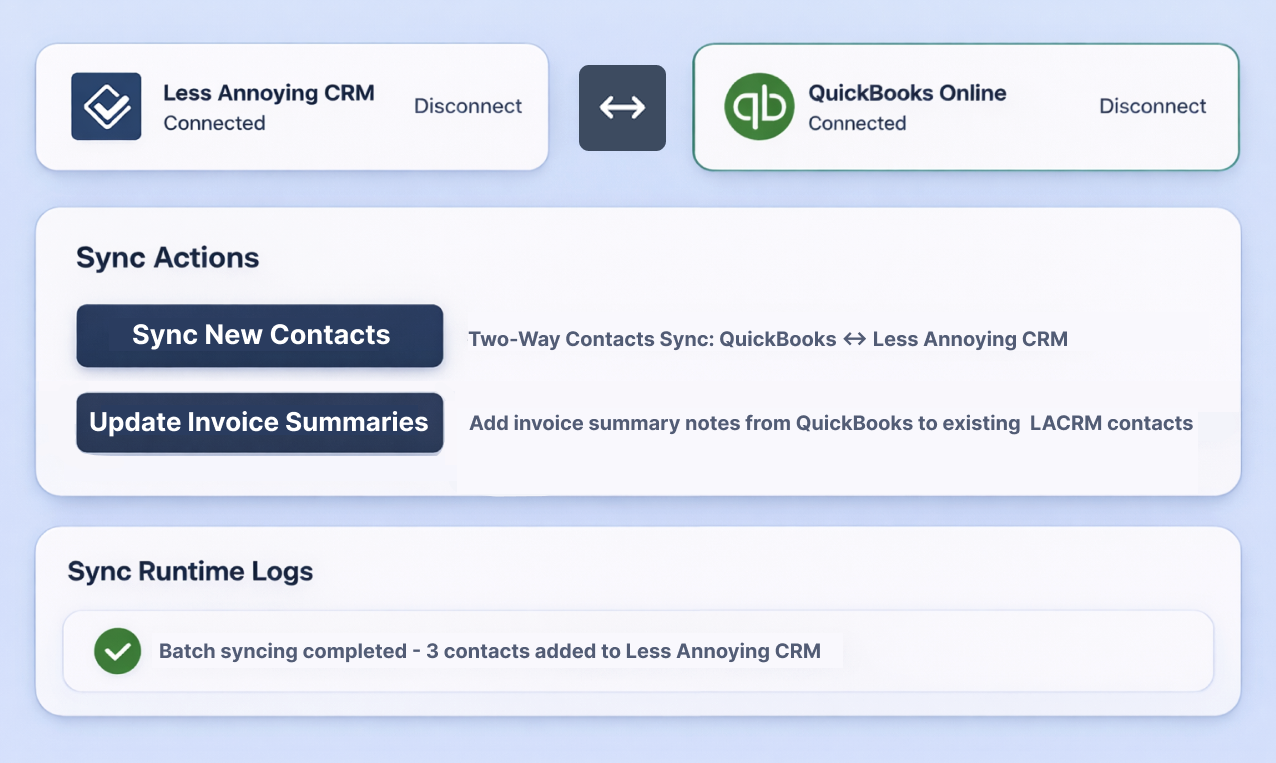
Add QuickBooks invoice summaries to LACRM
Run Update Invoice Summaries to add a note onto every matching LACRM contact containing their up-to-date QuickBooks invoice picture — unpaid invoices, overdue invoices, payment status, and totals. Sales and support now have financial context right inside the CRM, without ever logging into QuickBooks.
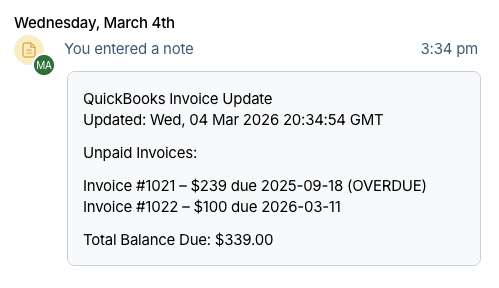
That's it. For a deeper walkthrough of the sync engine, batching logic, and resume behavior, see the How It Works page.
What Data Syncs Between LACRM and QuickBooks
Contacts (Two-Way)
Contacts flow in both directions — LACRM → QuickBooks and QuickBooks → LACRM. Fields synced include:
- • Name
- • Phone
- • Company
- • Website
- • Address
Invoice Summaries (One-Way)
Invoice data flows from QuickBooks into LACRM as notes on matching contacts. Each note includes:
- • Unpaid invoices
- • Overdue invoices
- • Payment status
- • Totals
Two-way invoice sync is on the roadmap.
Common Issues When Connecting LACRM to QuickBooks
"Sync failed — QuickBooks contact missing a name"
QuickBooks requires every customer record to have a display name. Open the failing customer in QuickBooks, add a name, and re-run the sync.
"Duplicate contact in LACRM"
If you already have two contacts in LACRM with the same name or email, the smart matcher can't pick a winner. Merge duplicates inside LACRM first, then re-run the sync.
"Invoice summary didn't appear"
Invoice summaries only update once every 24 hours per contact, and only for contacts that have pending or unpaid invoices in QuickBooks. Contacts with no open invoices are skipped.
Frequently Asked Questions
Ready to Connect Less Annoying CRM and QuickBooks?
Set up two-way contact sync and QuickBooks invoice summaries inside LACRM in about 5 minutes. Free 14-day trial, no credit card required.